Theme 1.4.2Chat, client, server, and channel info rebuilt in one visual system.
ts.7h.al · Resources
TeamSpeak add-on
Download the community add-on and follow the installation guide.
7H.AL TEAMSPEAK ADD-ON
Bring your 7h.al profile into TeamSpeak
The official dark theme and Profile Bridge turn TeamSpeak's compact info pane into a readable extension of your community profile.
Local social icons
Public profile data only
Live client selection
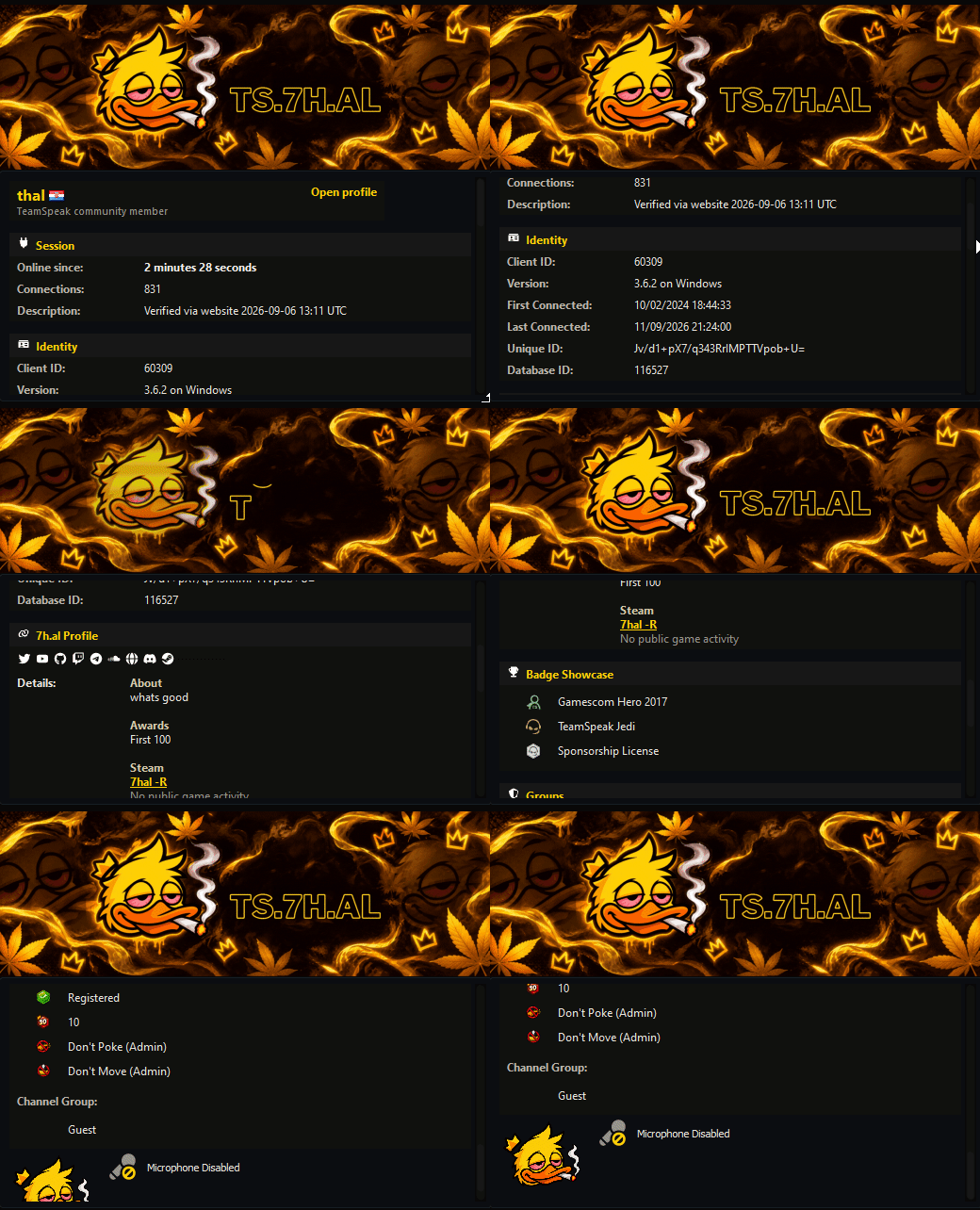
Profile Bridge 0.3.1Loads the selected client's safe public profile summary from ts.7h.al.
One-click installersSeparate add-on packages make updates and rollback straightforward.
More useful information, less visual noise
The latest package focuses on reliable local assets, cleaner hierarchy, and information that helps while you are actually using TeamSpeak.
Profile card
Name, country, avatar, identity, connection history, and a direct website profile action.
Clickable socials
Only configured social accounts appear. Icons are copied locally by the plugin, so TeamSpeak never has to render remote images.
Award showcase
TeamSpeak badges remain in their own compact section with native names, descriptions, and icons.
Steam activity
Public Steam state can show the linked account and current game without exposing private library data.
Server overview
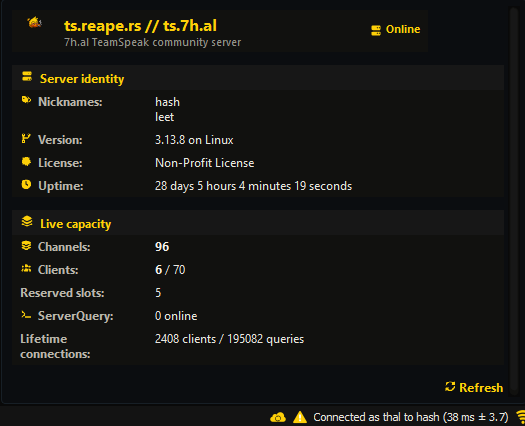
Server identity, address, uptime, live capacity, query load, and refresh controls now follow the client-card layout.
Channel overview
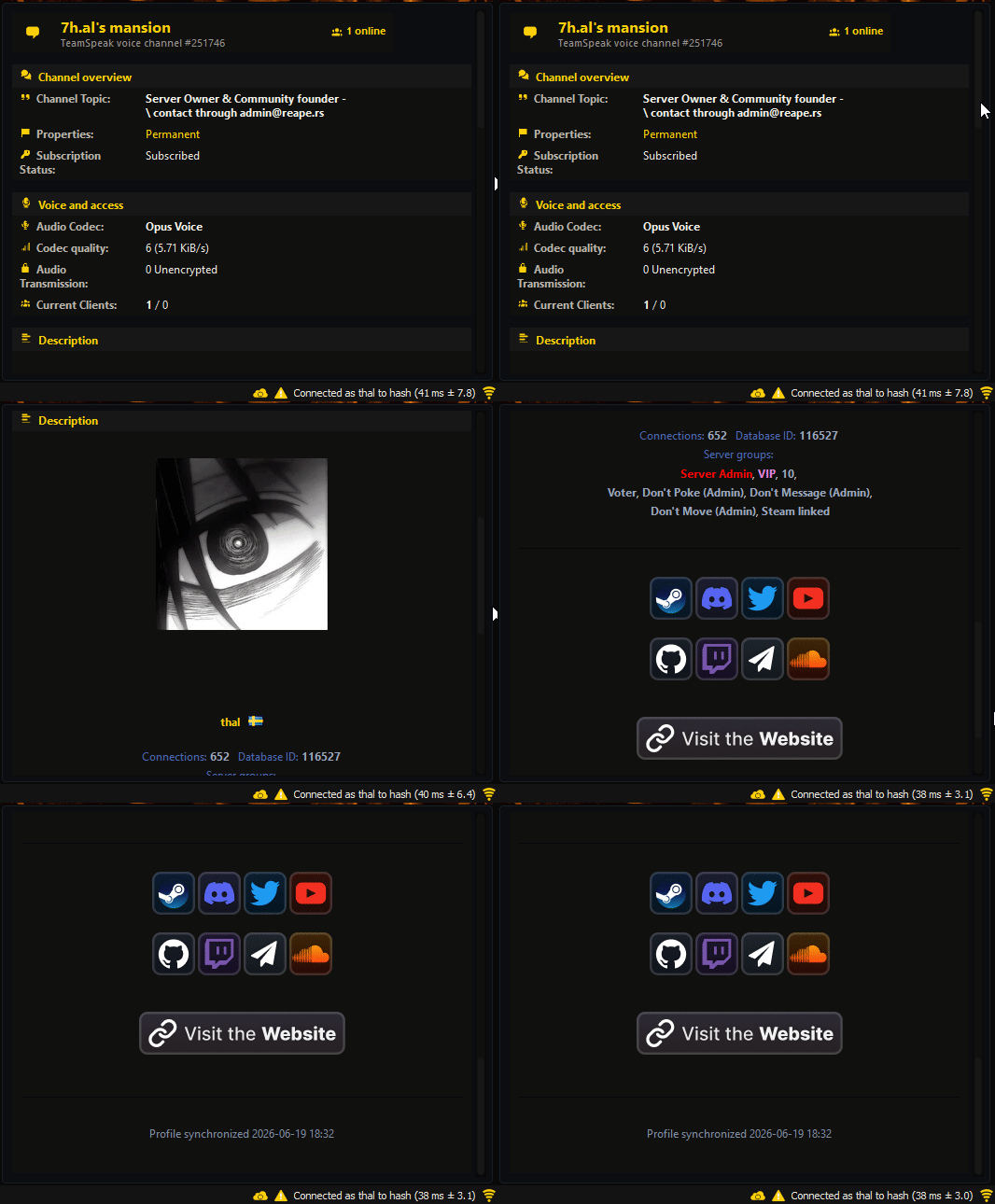
Clicking a channel now opens a matching card for its topic, codec, occupancy, security, talk power, and description.
SERVER INFO REDESIGN
Server information without the whole client window
This focused preview shows the actual server information pane: server identity, aliases, build and license details, uptime, channel capacity, clients, reserved slots, and ServerQuery load.
- Local Font Awesome PNG icons
- Correct reserved-slot handling
- Responsive TeamSpeak info-frame tables
CHANNEL INFO REDESIGN
Click a channel and get a useful overview
The channel panel follows the same compact language as client and server information, with the current occupancy visible immediately and deeper details grouped by purpose.
- Topic, permanence, and subscription state
- Codec, quality, encryption, and talk access
- Current occupancy and channel description
Release history
Patch notes
Theme 1.4.2Current
Migrated profile and social links to ts.7h.al while retaining the custom client, server, and channel information panels.
Theme 1.4.0Previous
Rebuilt server info, added local server-section icons, corrected malformed capacity markup, and refreshed the add-on presentation.
Profile Bridge 0.3.1Plugin
Migrated every plugin API request to ts.7h.al while retaining local social icon synchronization, cached reads, and clickable profile links.
Theme 1.3.4Previous
Introduced the sectioned client info card, profile actions, identity details, Steam activity, and badge presentation.
Setup
Install in four steps
- 1
Close TeamSpeak completely so its loaded theme and plugin files can be replaced.
- 2
Install the 7h.al theme, then install the Profile Bridge.
- 3
Start TeamSpeak, choose the 7h.al style, and enable the bridge in the add-ons or plugins menu.
- 4
Select a client or the server to open the new information panels.
TeamSpeak may show a security warning because the plugin connects to the 7h.al website API. This is expected; the response contains public profile fields only.
WEBSITE API
Inspect example responseA small bridge, not a second account system
The selected TeamSpeak database ID is sent to the public client-info endpoint. The result includes supported public profile fields, configured social keys, awards, and permitted Steam status.
https://ts.7h.al/api/getclientinfo.php?cldbid=154081